



The Key to Writing SEO Friendly URL's
Learn How to Write Attractive, User-Driven URLs for SEO
SEO prognosticators harp on ceaselessly about quality content, quality content, quality content. YES, quality content is important. But there's no one single ranking factor standing between you and fistfuls of cash.
You'll be stuck panhandling on page 5 of Google search results pages without an SEOer with strict and obsessive attention to detail. When creating a new page for your website, you best write an SEO-friendly URL.
I. Use Strategically Placed Keywords in your URLs
The URL for your web page must feature a primary set of keywords you want the page to rank for. Not ALL the keywords. Just the top-level "parent" keywords you're dreaming to rank for.
You don't need to do much of any digging to find keywords to plug into your URL. If you're the reader, what are the absolute essential words you're looking for before clicking?
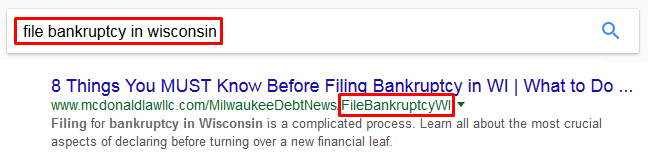 Overlong URL's muddy the waters and make the purpose of the page unclear. You could potentially drive important keywords off the search result. Keep it short and sweet. Hit the important stuff and let the content in the article pull the rest of the weight.
II. Avoid Outrageously Long URLs at all Costs
At one point or another, every search engine user has come across a URL that could fill multiple Word doc pages. Not only is this unnecessary clutter a visual nightmare, but Google severely downranks pages with obnoxiously long URLs.
To Google, a long URL is a direct representation of a website that contains poor coding, a high number of glitches and is probably not well maintained. It’s up to SEO specialists, like our team of creative geniuses at iNET Web, to clean up polluted URLs and create new ones to better attract new potential clients and revenue.
1) Avoid using parameters: Some parameters are unavoidable. BUT, if you can, use words in your URLs. Get creative and come up with something catchy, easy to remember, and short. Remember, you want a descriptive URL - not a complicated one.
2) One page should have one URL: That’s it. Not two, three, four, or five…ONE URL per page. If this is not the case, find a way to fix it immediately. Don't confuse Google with two identical pages.
3) Remove session IDs from URLs: There are many different methods for removing session IDs from your URL depending on your specific situation. There’s even software out there made just for this purpose! A quick Google search should get you started.
III. Do Not Continually Repeat Words in your URLs
Try not to use keywords twice in the same URL. Google bots view this as spammy, and repetition increases the length of your URL. Repeatedly keyword mining URLs is not only a waste of time and space, but it confuses users and severely hinders user experience.
Instead of repeating a URL in your domain, fit in another important keyword - or none at all. Sometimes concision is the way to go.
What to Do After You Change URLs on your Website
After any URL has been edited to optimize SEO value, there is still another very important step. You must use 301 redirects on all of your old URLs to direct them to your new and improved version. Google's got to know it's a new version of an existing page rather than something brand new.
Changing URLs will inevitably impact your traffic and search results rankings. On the other hand these changes can be very minute if you properly use 301 redirects. Redirect all of your old URLs to the new ones, and if you’ve removed pages completely, try and redirect to the most closely corresponding page that is still live. Google spiders hate it when your redirect all old URLs to the homepage, and your site will suffer. Avoid doing this in any situation!
To learn more about iNET’s SEO-boosting, profit-generating online services, contact us today!
